A step-by-step guide to preparing your organization for a successful PPM software deployment - from planning and requirements gathering to building the right team and managing change.
Studies consistently show that 70% of enterprise software deployments fall short of their goals - not because of the technology, but because of the people and processes around it. Once the right project portfolio management (PPM) software has been selected, organizations face a second, equally important challenge: deploying it in a way that drives genuine adoption and lasting change.
Although the chosen vendor typically leads the deployment, even the best implementation team will fail if the customer does not take the necessary steps to prepare its own people for the change ahead. PPM solutions are only as good as the people who use them. A successful installation provides the vehicle for improvement - without organizational commitment, PPM investments quickly become unwanted shelf ware.
This guide outlines the four steps organizations must take to prepare their teams for a successful PPM software deployment - one that improves project visibility, strengthens processes, and builds the collaboration needed to deliver on strategic objectives.
Step 1. Treat deployment as a project: build a structured plan first
Rigorous deployment planning is the first step an organization must take to position its new PPM solution on the right track. Together with the chosen vendor, the organization must define the deployment project plan, its objectives, and the risks associated with the change. The plan serves a dual purpose: communicating what is involved to end-users, and beginning the process of organizational buy-in that will ultimately lead to adoption.
A comprehensive software deployment plan should include four phases:
Phase 1 - Deployment Definition: Clearly define the overall objectives of the PPM technology and its application to the business. All project stakeholders must be involved so that expectations are aligned from the start.
Phase 2 - Project Management: Once objectives are defined, document a detailed plan of the major tasks required to execute deliverables. This is the roadmap for getting the PPM system up and running.
Phase 3 - Implementation Support: Define the roles and training required, along with material resources such as hardware, software, and documentation. Use this phase to identify any gaps in support that could impede progress.
Phase 4 - Deployment Requirements: Develop a list of site-specific requirements and acceptance criteria agreed upon by all parties. This establishes shared expectations before a single line of configuration is written.
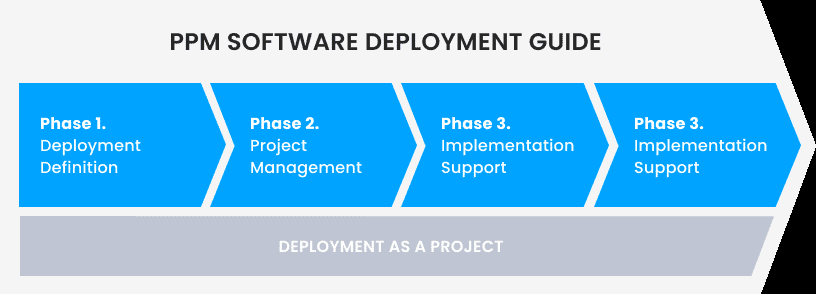
The objective of the deployment plan is to build a blueprint for success aligned with corporate objectives and vendor expectations. When all required parties are involved in its development, planning itself becomes a powerful tool for securing adoption before deployment even begins.
Tip: Involve end-users in planning, not just stakeholders
Organizations that include frontline project managers in the planning phase - not only executives and IT - report higher adoption rates and fewer post-launch surprises. Their input surfaces practical constraints that executive sponsors rarely see.
Step 2. Requirements gathering: set realistic expectations early
It is not uncommon for organizations to set ambitious goals during the evaluation process. Once a solution is selected and a deployment plan established, however, teams generally realize that initial "quick wins" are necessary to build confidence in the new system. Unrealistic expectations are one of the most common reasons deployment projects struggle before they even begin.
The requirements gathering stage is where implementer and customer align on what is achievable. One of the most effective strategies is to first assess the project management maturity of the organization - evaluating its people, processes, and technology against industry best practices. This maturity assessment clarifies which aspects of the PPM system will be adopted quickly and which will require more effort, allowing both parties to plan realistically.
The output of this stage is a requirements gathering document, prioritized according to the organization's needs and structured in phases - from initial pilot to full rollout. This document acts as a shared barometer of progress and builds the transparency and trust that underpins a successful vendor-customer partnership.
Key questions to ask your vendor during requirements gathering
- Which of our requirements can be met out-of-the-box, and which require configuration or customisation?
- What does a realistic phased rollout look like for an organization at our maturity level?
- How will the system integrate with our existing tools (ERP, scheduling, resource management)?
- What does success look like at 30, 90, and 180 days post-deployment?
Step 3. Build the right deployment team: align people, process, and technology
Once expectations and goals are aligned, the next step is to assemble a deployment team that includes all the critical stakeholders needed to drive the success of the PPM initiative. Clearly defining customer and consultant roles - and identifying business sponsors and internal champions - ensures the deployment project delivers on its objectives.
A well-structured deployment team bridges the gap between organizational needs and the technology designed to meet them. On the customer side: business sponsors, stakeholders, and project managers. On the vendor side: implementation consultants, technical support, and account management. This balance ensures that consulting resources are used efficiently and that subject-matter expertise is built within the customer organization during deployment - not just after it.
For organizations managing hybrid or distributed teams - increasingly common in 2026 - it is also worth designating regional or departmental champions who can support adoption across time zones and working styles. Deployment teams that account for this dynamic see faster user uptake and fewer escalations post-launch.
A strong partnership with the selected vendor maximizes the ROI on professional service days. Having the right deployment team minimizes misinterpretation and miscommunication - the primary culprits behind misalignment, delays, and bottlenecks.
Step 4. Prepare for change: turn resistance into adoption
Developing a change management strategy as part of your deployment project is as important as the technical deployment itself. A successful PPM rollout must go beyond installation, configuration, and training - it needs a deliberate strategy to encourage product adoption. Resistance to change and organizational inertia must be anticipated and addressed, or the PPM system will never fit culturally within the organization, however well it fits functionally.
The change management component focuses on the people side of the equation. Human beings resist change even when it brings clear improvement. A structured change management strategy helps navigate the cultural shift that inevitably accompanies the introduction of new PPM technology, and aligns the positive outcomes of the new system with the daily challenges each stakeholder group experiences.
The message to end-users should communicate concrete benefits:
- Better alignment of organizational goals with project activities
- Enhancement of individual working experiences
- Improved quality of services for customers
- Improved transparency and visibility into project data
- Improved productivity and reduction in wasteful project activities
Effective change management also requires a communication cadence - regular updates that reinforce the "why" behind the deployment, celebrate early wins, and address concerns before they become resistance. Consider structured training programmes, role-specific onboarding sessions, and a feedback loop that allows end-users to surface issues during the rollout rather than after it.
Finally, define adoption metrics from day one. What does good adoption look like at 30, 60, and 90 days? Tracking login rates, feature usage, and reporting activity gives leadership an early signal if adoption is lagging - and time to intervene before bad habits set in.
Common PPM deployment mistakes to avoid
Even well-resourced deployments run into predictable problems. The most common ones:
- Skipping the maturity assessment. Deploying a sophisticated PPM system into an immature organization leads to underuse and frustration. Assess first, configure second.
- Treating deployment as an IT project. PPM deployment is a business transformation. Without executive sponsorship and business ownership, IT-led deployments stall at the user adoption stage.
- Deploying everything at once. A phased rollout that delivers quick wins builds momentum and trust. A big-bang deployment that overwhelms users kills adoption.
- Underinvesting in training. One-time training sessions are rarely enough. Role-specific, ongoing training - especially as the system evolves - is what separates organizations that get full value from those that use 20% of what they paid for.
- Ignoring integration requirements. PPM software that doesn't connect to existing ERP, HR, or scheduling tools creates duplicate work. Define integration requirements during the requirements gathering stage, not after go-live.
Frequently asked questions
How long does a PPM software deployment typically take? For mid-sized organizations, a phased PPM deployment typically runs 3-6 months from kick-off to full rollout. Larger enterprises with complex integrations or multiple business units may require 9-12 months. A well-structured plan with clear milestones keeps deployment on track regardless of size.
What is the biggest risk in a PPM deployment? Low user adoption. Organizations that invest heavily in software selection and configuration but underinvest in change management consistently see the same result: a well-configured system that nobody uses. Addressing the people side of deployment with the same rigour as the technical side is the single most important factor in deployment success.
Should we deploy all PPM modules at once or in phases? In phases, almost always. Start with the modules that deliver the most immediate value to the most users - typically portfolio visibility and resource management - then expand. Phased deployment generates early wins, builds organizational confidence, and gives the team time to develop the subject-matter expertise needed to configure and use advanced features effectively.
How do we measure PPM deployment success? Define adoption metrics before go-live: active user rates, feature usage, reporting frequency, and time-to-update on project status. Beyond adoption, measure business outcomes - portfolio visibility, on-time delivery rates, resource utilisation - at 90 days and 6 months post-deployment to demonstrate ROI to leadership.
Making your PPM deployment a success
A PPM software deployment is not just a technology project - it is an organizational transformation. The four steps outlined in this guide - deployment planning, requirements gathering, team alignment, and change management - form a proven framework for moving from software selection to full adoption without the common pitfalls of shelf ware and post-launch abandonment.
Organizations that invest as much in preparing their people as they do in selecting the right software consistently achieve faster time-to-value and higher user adoption rates. If you are approaching a PPM deployment and want guidance tailored to your environment, explore our implementation and training services to see how Cerri Project supports organizations at every stage of the journey.
How useful was this article?
Get enterprise PM insights, no noise
A bi-monthly briefing on Stage-Gate governance, portfolio management, and enterprise delivery best practices.
No spam. Unsubscribe anytime.
Prefer video? Watch on YouTube
Walkthroughs, Stage-Gate demos, and manufacturing PM best practices on our channel.